
Planes Live - Flight Tracker
Mosaic SrlTravel & Local
4.0717.00 Reviews
- Version
- 1.44.4
- Installs
- 5.00M
- Age Rating
- Everyone
Screenshots
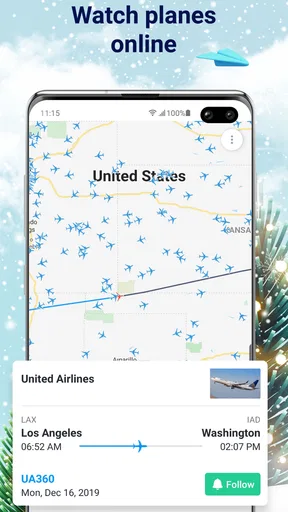
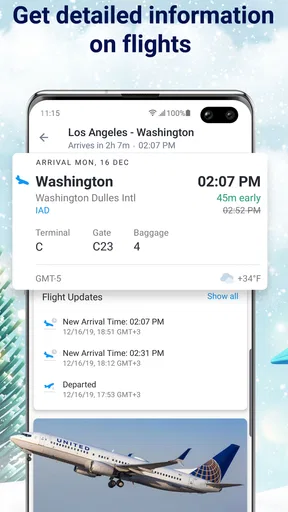
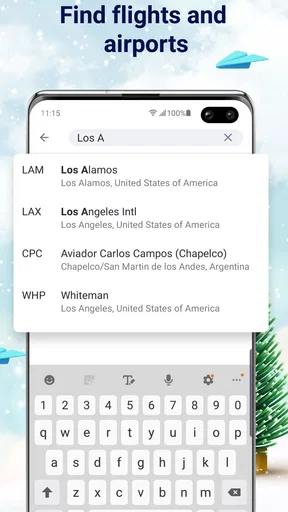
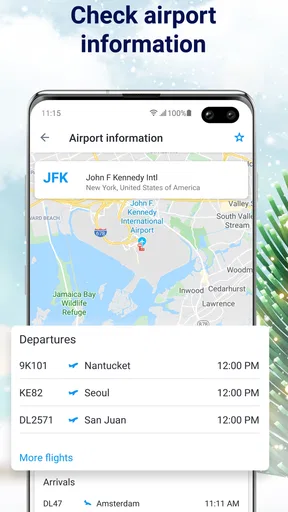

Our Review of Planes Live - Flight Tracker
 Analysis by Appyee
I’m the sort of person who checks a flight when someone I care about is travelling, then checks it again when the airport pickup plan starts to feel uncertain. Planes Live - Flight Tracker is built for that mix of practical waiting and plain curiosity: it puts moving aircraft on a map and makes airport and flight information easier to follow from a phone. I find it most useful when I have a particular journey in mind, rather than when I’m looking for a complete substitute for an airline’s own travel updates.
That distinction matters. A radar-style view can answer “Where is the plane now?” in a way a departure board cannot, while an airline or airport is often the more direct place to check what a passenger should do next. Used together, those sources serve different needs. Planes Live is the visual companion: it helps me understand the journey in progress, not take over every part of travel planning.
A useful starting point when plans are still uncertain
Imagine a friend is flying in and I’m deciding when to leave home. The flight number gives me a clear starting point, and the map can add context that a scheduled arrival time alone doesn’t provide. If the aircraft is still en route, I can see its progress rather than repeatedly refreshing a clock and guessing whether the original plan still makes sense.
That kind of check is helpful, but I wouldn’t treat a map position as a promise about the exact moment someone will walk through the terminal doors. The aircraft’s progress and the passenger’s arrival at the pickup point are separate stages. After landing, there may still be time spent getting off the plane and making the way through the airport. I use tracking to prepare for a pickup, then confirm the practical details with the traveller instead of assuming the plane’s position settles everything.
This workflow also suits people who aren’t meeting anyone. If I hear an aircraft overhead, exploring what’s moving across the map can turn a passing sound into a small aviation rabbit hole. The difference from a basic flight-status screen is that the map gives the journey a sense of direction and place. For someone who likes to understand routes visually, that is the app’s most distinctive everyday appeal.
Following a flight from search to arrival
When I follow a flight, I start by narrowing the question: am I checking progress, planning a pickup, or simply curious about the route? Searching for the flight or beginning with an airport gives me a clearer path than browsing every aircraft on the map. From there, I can use the moving view for context and decide what needs a separate check before I act.
Search first, then use the map for context
The app’s flight search gives me a more focused way into the experience than scanning a crowded map. Looking up a flight by its number, or starting with an airport, makes it easier to find the journey I care about. From there, the aircraft view adds context: I can follow a route and see details such as altitude and speed when I tap an aircraft icon.
My practical tip is to begin with the flight number whenever I have it. It narrows the task to one journey and avoids the distraction of nearby aircraft. If I’m just browsing, the map is more enjoyable; if I’m coordinating a pickup, a direct search is the sensible first move. I also keep the question I’m trying to answer in mind. “Is the flight moving?” and “What should I tell the person collecting the passenger?” are not quite the same question.
For instance, I might check the aircraft’s progress, note whether the estimated arrival picture has changed, and then message the person travelling if the plan needs a human confirmation. That handoff is important: the app can help me decide when to check in, but the passenger has the best view of their own airport experience. Treating the tracker as one step in a conversation is more dependable than making a pickup decision from a map alone.
Alerts and weather add useful context
For a flight I expect to follow over time, the option to set an alert can save me from reopening the app every few minutes. I can let a notification prompt the next check instead of keeping the map open while I work or travel. I find this especially useful when the flight matters but does not require my constant attention. Alerts make the app easier to fit around a normal day, though I still check the relevant flight information directly when timing is important.
The weather overlay adds another layer when a journey appears delayed or changes course. It can help me think about conditions around a flight rather than treating the route as an isolated line on a map. I see it as context, not a forecast of what will happen to a specific passenger’s itinerary. Weather and flight operations can be complicated, so the overlay is most useful for understanding the bigger picture, not for deciding on its own that a delay has a particular cause.
There is a small but worthwhile trade-off here: extra visual information can make a map more interesting, but it can also give me more to interpret than I need. When I’m only arranging a ride, I focus on the flight and its timing rather than exploring every layer. When I have time to browse, the added context is part of the fun. Knowing which mode I’m in keeps the app helpful instead of turning a simple check into a long distraction.
Where it fits among travel tools
Compared with checking an airline’s flight page, a radar map is better for seeing movement and satisfying curiosity about the route. The airline’s own information is usually the more appropriate reference for passenger-specific instructions, itinerary changes, or what to do at the airport. An airport board is useful for a quick local departure or arrival check, but it won’t give the same broad visual view of aircraft in motion. I wouldn’t insist on choosing just one: I use the source that matches the question.
That division of labour is also why I would not rely on the app as my only travel tool. If I am a passenger, I still want the airline’s direct updates for decisions about my booking. If I am waiting to collect someone, the tracker can help me time a check-in, but I still need to coordinate with the traveller. For aviation fans, by contrast, the moving map is a more engaging place to spend time than a list of statuses, even when no immediate travel decision depends on it.
It is a good fit for people who enjoy following aircraft, relatives who want a clearer picture of a journey, and anyone coordinating an airport pickup from a distance. It is less suited to someone who only needs a single, official instruction about a booking, or who finds maps and live movement more distracting than useful. If all I need is to know whether my own flight has a changed gate or a new airline instruction, I go to the carrier first.
What to expect from the app itself
Planes Live is a free travel and local app from Mosaic Srl, with an Everyone age rating. Its average rating is 4.0 from around 71,000 ratings, and it has passed 5 million installs. Those figures suggest it has found a broad audience, but they don’t tell me whether it fits my particular routine; the real test is whether I value the map, alerts, and extra flight context enough to open it regularly.
The app was released on December 20, 2019, and version 1.44.4 is listed for devices running Android 7.0 or later. The basic decision is easy to understand: try the free app for the kind of flight following it offers, then think carefully before paying for extras. In-app purchases range from $0.99 to $99.99 per item, so I would check what a particular purchase includes and whether I actually need it before confirming anything. The range is wide enough that I would not treat “free” as a guarantee that every feature I might want is included.
One practical habit is to decide in advance whether I’m using the app for one trip or as a regular hobby. For an occasional pickup, the free experience may be all I need; if I find myself returning often and wanting more, that is the moment to review the purchase options rather than upgrading on impulse. I also avoid leaving myself with several competing sources open. A tracker for movement, the airline for passenger instructions, and a direct message for coordination is a clearer workflow than trying to make one screen answer everything.
Where the flow can break
The app’s map can lag when I zoom in or out, which is a real nuisance when I’m trying to follow an aircraft closely. It is not enough to spoil the whole experience, but it does make rapid, precise map browsing less pleasant. I find it better to search for the flight first and give the map time to settle than to keep pinching and panning in a hurry. If a quick answer matters, I switch to a simpler status check rather than fighting the map.
There is also a difference between seeing a flight’s progress and knowing exactly what is happening to a passenger. A route view can inform my expectations, but it cannot replace a message from the person travelling or the direct guidance they receive. That limitation is not unique to this app; it is a reason to use tracking as supporting information. The most reliable outcome comes from combining the visual picture with the right handoff at the right time.
Another point to consider is attention. A live map invites repeated checking, particularly when the aircraft is close to its destination. Alerts can reduce that habit, but anyone who tends to monitor every update may find the experience more absorbing than necessary. I try to set a sensible check-in point, use a notification when appropriate, and get on with the rest of the day. That makes flight tracking useful without turning it into a minute-by-minute obligation.
For someone who wants only official passenger updates, a carrier’s own app or airport information is the better first choice. For a person who wants to see aircraft movement and understand a flight spatially, Planes Live offers a more compelling view than a plain status list. The right choice depends less on which tool has the most information and more on whether the information answers the question I actually have.
Ever found yourself daydreaming about taking to the skies, but you're stuck on the ground? Well, you're not alone. That's why I decided to try out Planes Live - Flight Tracker, an app that's supposed to bring the sky to your fingertips. Let me take you through my journey with this app and see if it truly makes me feel like a pilot, or just leaves me grounded.
First Impressions and Interface
Opening Planes Live - Flight Tracker for the first time felt like stepping into an air traffic control room, minus the stress. The interface is sleek and intuitive, which is a big win in my book. You get a world map view right off the bat, dotted with little airplane icons buzzing around. It's not cluttered, which is crucial for an app that could easily overwhelm with too much data.
The app's design is clean, with a user-friendly layout that doesn’t require a pilot's license to navigate. The main screen offers a clear view of active flights, and tapping on an aircraft icon provides details like its flight path, altitude, and speed. It’s like having a flight radar in your pocket.
Features That Soar
One of the standout features is the real-time flight tracking. You can search for flights by number or airport, and the app provides updates on departure and arrival times. This is super handy if you're picking someone up from the airport or just curious about where a particular flight is.
There's also a nifty feature that lets you set alerts for specific flights. Want to know when your friend's plane is about to land? Just set an alert, and you're good to go. The notifications are timely, ensuring you don't miss a beat.
"If you're an aviation geek or just someone who loves to track flights, this app is a treasure trove of information."
The app offers a weather overlay, which is super cool. You can see how weather conditions might affect flights, adding another layer to your flight-following experience. This feature is particularly useful for understanding delays or route changes.
Some Turbulence Along the Way
Every app has its rough edges, and Planes Live - Flight Tracker is no different. While the app offers a lot of information, some of it requires a premium upgrade. This isn't a deal-breaker, but if you're hoping for unlimited access to all features, you might find yourself reaching for your wallet.
I also noticed occasional lag when zooming in and out of the map. It’s not a major issue, but it can be a bit annoying if you're trying to follow a flight closely. Patience is key here.
The Final Descent
In the end, Planes Live - Flight Tracker is a solid pick for anyone fascinated by aviation or just looking for a reliable way to track flights. The app's strengths lie in its real-time updates and user-friendly interface, making it a valuable tool for both casual users and serious flight enthusiasts.
Sure, there are a few minor hiccups, like the occasional lag and premium features, but they don’t overshadow the app's overall performance. If you're ready to explore the skies from your smartphone, this app might just be your ticket to a front-row seat.
Whether you're tracking a loved one's journey or just indulging in some sky-high curiosity, give Planes Live a whirl. You might find yourself hooked on the fascinating world of flight tracking, one altitude at a time.
Verdict
Strengths of Planes Live - Flight Tracker
- Real-time flight updates.
- User-friendly interface.
- Customizable notifications.
- Detailed airport information.
- Global coverage of flights.
Limitations of Planes Live - Flight Tracker
- Ads can be intrusive.
- Requires internet connection.
- Limited features in free version.
- Occasional data inaccuracies.
- Subscription can be pricey.
Other Releases by Mosaic Srl
View All
Weather Live°
Weather4.4

Clime: NOAA Weather Radar Live
Weather4.2

Blossom - Plant Identifier
Education4.4

Robokiller - Spam Call Blocker
Communication3.8
Similar Picks in This Category
View All
Google Maps
Google LLC3.4

Google Maps Go
Google LLC4.1

Booking.com: Hotels & Travel
Booking.com Hotels & Vacation Rentals4.8

Google Earth
Google LLC3.8

Skyscanner Flights Hotels Cars
Skyscanner Ltd4.8

trivago: Compare hotel prices
trivago N.V.4.4
Frequently Asked Questions
What features does Planes Live - Flight Tracker offer?
Planes Live - Flight Tracker provides real-time flight tracking with comprehensive details on flight status, including departure and arrival times, delays, and cancellations. It also offers a map view to track flights globally, along with airport information and weather updates. Users can set notifications for specific flights to stay informed.
Is Planes Live - Flight Tracker free to use?
Planes Live offers a free version with basic features. However, for an ad-free experience and access to additional features such as detailed flight analytics and advanced notifications, users can opt for the premium subscription. The premium version provides more in-depth insights and a more seamless experience.
How accurate is the flight tracking information in Planes Live?
The app sources its data from reputable aviation data providers, ensuring high accuracy. Real-time updates are provided, but occasional discrepancies can occur due to various factors like network connectivity or data provider delays. Users generally find the app reliable for tracking flight status and schedules.
Can I track multiple flights simultaneously with Planes Live?
Yes, Planes Live allows users to track multiple flights at once. You can save flights to your favorites or set notifications for different flights to receive timely updates. This feature is particularly useful for frequent travelers or those coordinating pickups and drop-offs for multiple flights.
Is Planes Live - Flight Tracker available on both Android and iOS?
Yes, Planes Live - Flight Tracker is available for download on both Android and iOS platforms. Users can find the app on the Google Play Store and the Apple App Store. It is designed to provide a seamless experience across different devices, ensuring accessibility for a wide range of users.
